Constraint creates clarity
PulseTap filters infinite sound into usable space—key, mode, and rhythm— so ideas can emerge quickly without friction.
An instrument in every pocket.
Not for finishing songs. For discovering them.
PulseTap is a musical sketching environment designed to capture a song while it is still becoming. Before production. Before perfection. Before the idea disappears. Define tempo, shape transitions, explore modes, build energy, and sketch structure in real time— so musicians can focus on movement, interaction, and emotional direction before committing to sound.
PulseTap is not presented here as a finished product. It is an evolving musical research lab: a place where timing experiments, interface sketches, hardware ideas, and collaboration questions remain visible while they are still changing.
Loading project signals from the lab bench...
The journal holds longer reflections about musical structure, emotional direction, browser-based sketching, collaborative trust, and the philosophy behind PulseTap’s design decisions.
Opening the development journal...
Music is not just sound—it is movement through constrained frequency space. A key defines the palette. A mode shapes emotional gravity. Tempo creates shared time. Structure creates expectation and release.
PulseTap exists in the phase before production: where songs are explored through interaction, tension, repetition, transition, and collective experimentation.
PulseTap exists before production—where songs are structured, not finalized.
PulseTap filters infinite sound into usable space—key, mode, and rhythm— so ideas can emerge quickly without friction.
This is not a DAW. It is where songs take shape: parts, loops, energy, and transitions—before production begins.
A song moves like a life: tension, release, surprise, resolution. PulseTap lets you design that journey before the notes are locked in.
PulseTap starts as a web instrument, expands to sensors outside the phone, and grows toward a wireless cube-shaped controller.
Playable pads, scale selection, local audio, session joining, Loop Mode, Save/Load/Share, and a host Song Board.
Now: software prototypeFinger taps, rings, conductive contacts, motion sensors, Bluetooth MIDI triggers, or other hand-based inputs.
Next: wearable experimentsSix sides, customizable panels, motion control, programmable scales, waterproof durability, and wireless connection to the session.
Future: physical instrument
A modular, tactile instrument designed for real-time musical collaboration.
Tap. Swap. Perform.
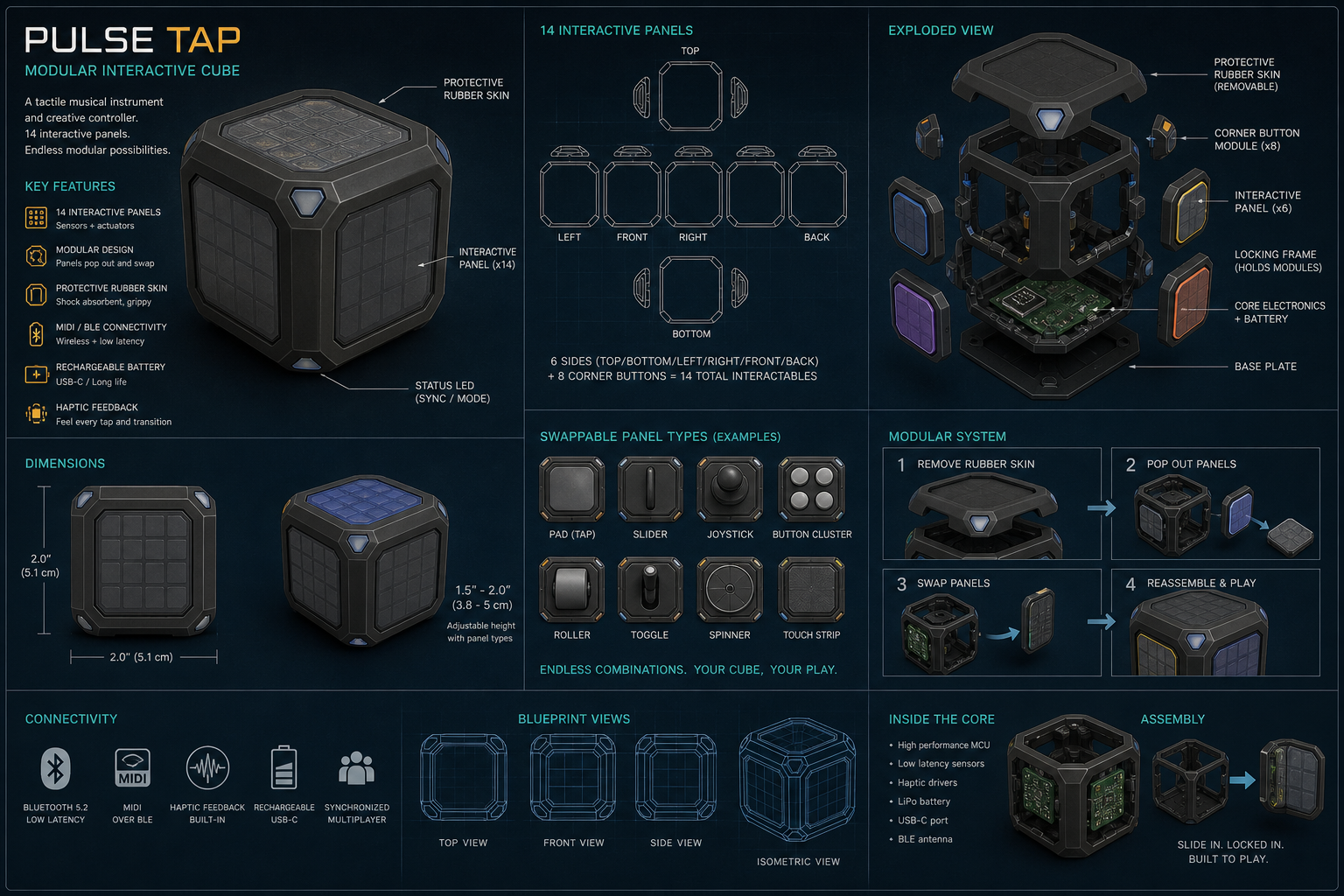
PulseTap began as a digital instrument — but it naturally evolved toward something physical.
A compact, rubber-encased instrument with 14 interactive panels, designed to be tapped, pressed, and played like a portable instrument.
Inspired by modular fidget systems, each panel can be removed and swapped:
The outer rubber skin protects the device while allowing access to a flexible internal frame — enabling users to reconfigure their instrument for different play styles and performances.
The outer brace protects the cube and creates recessed panels for touch-sensitive square pads. Each side can become an instrument, loop layer, effect surface, or control map. Corner panels can become mode, sync, record, send, mute, or shift controls.
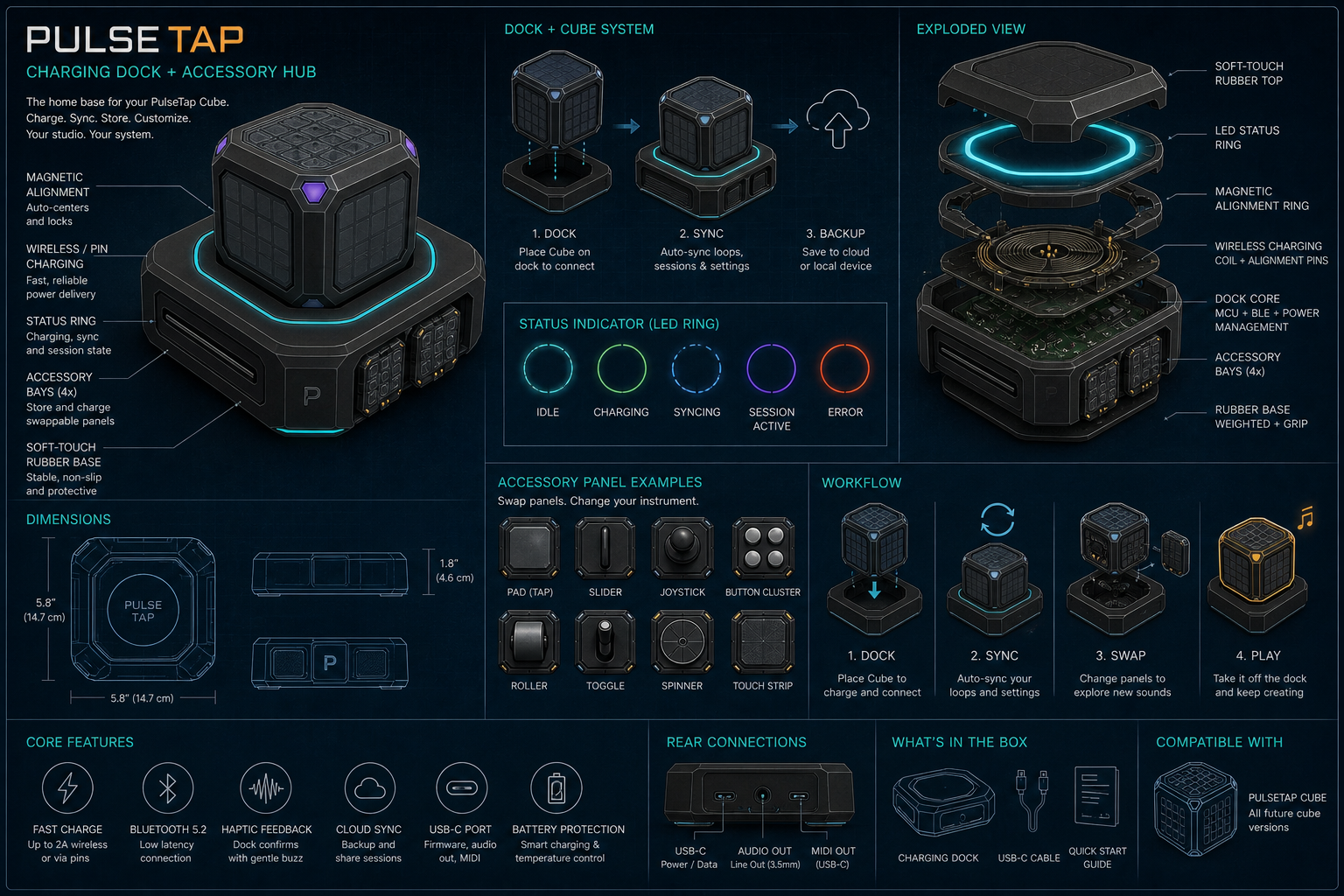
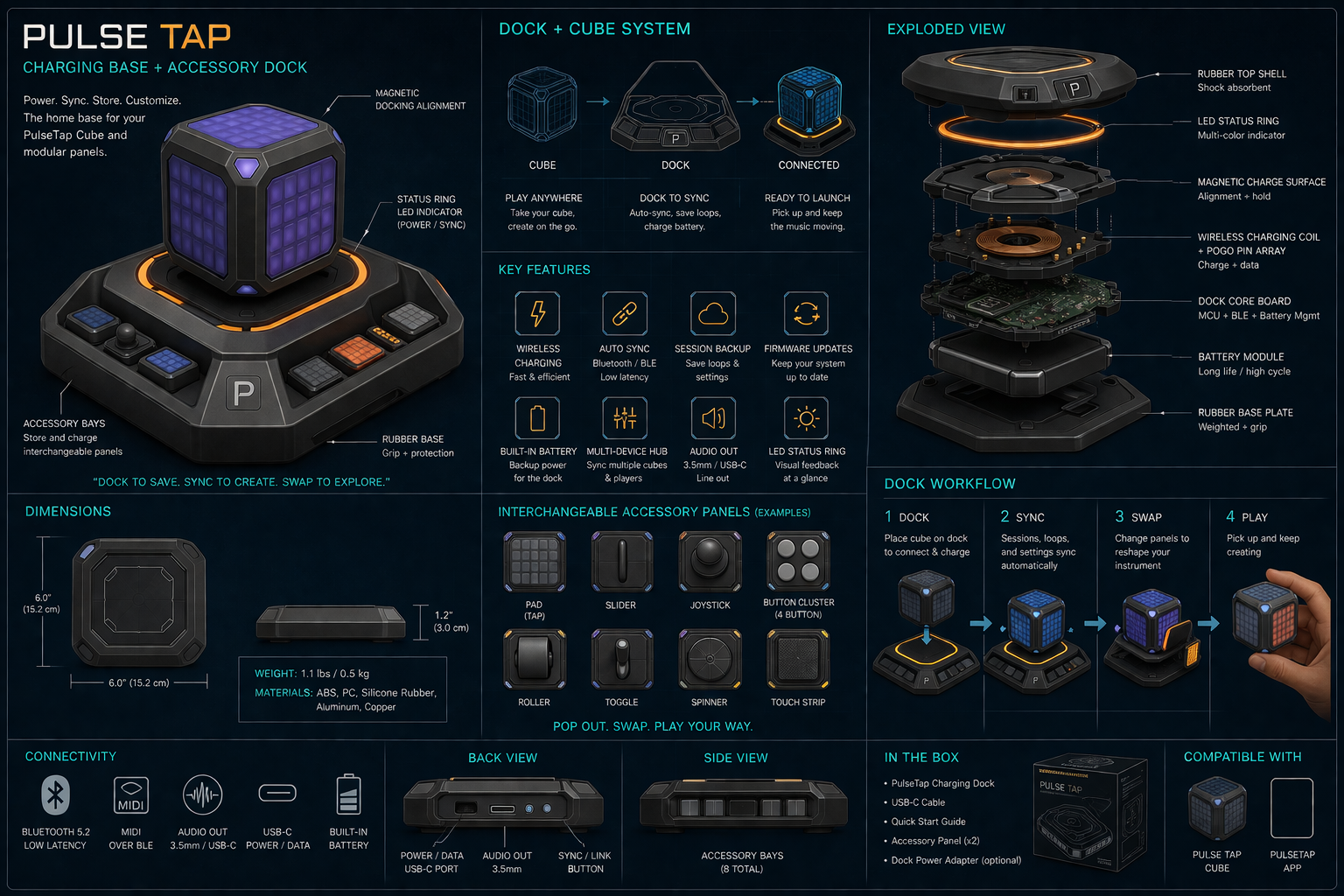
These dock concepts explore how the PulseTap Cube could charge, sync, store settings, organize swappable panels, and become a small studio hub when not being played.
PulseTap separates two musical behaviors that should feel different: live play and loop mode. Live play is immediate and expressive. Loop mode is synchronized, count-based, and shared. Solo Mode stays local.
Tap, improvise, audition ideas, and perform freely with immediate response.
Prepare loops privately, then arm them for synchronized entry into the shared arrangement.
Choose your own key, tempo, mode, and practice privately.
Multiple players contribute to one shared arrangement timeline directed by the host.
Fidget cubes proved that people love small, satisfying inputs: clicks, switches, rolling balls, buttons, and texture. PulseTap asks: what if those gestures could speak musically?
Buttons, switches, rolling balls, and click surfaces give immediate feedback and keep your hands engaged.
A light switch click could trigger a note. A rolling ball could bend pitch. Five metal buttons could become five tones in a scale.
PulseTap blends the physical satisfaction of a fidget device with the expressive power of an instrument.
Define timing. Shape parts. Build loops. Design transitions. Collaborate in structure before committing to sound..
Large tap pads trigger notes or percussion without complex menus.
Record a short pattern, play it back, save it, share it, and keep adding live taps on top.
Designed for private listening, walking, and testing with minimal setup.
Multiple users connect and turn individual tapping into a shared musical environment.
The host becomes conductor and arranger—bringing players, loops, transitions, and sections into the performance at the right moment.
Players create privately. The host performs publicly.
Host collects loops and arranges them into Intro, Verse, Chorus, and Bridge sections.
PulseTap separates creation from performance. Players privately sketch loops, textures, and ideas while the host shapes arrangement, timing, transitions, and collective flow for the room.
Everyone plays their way. All in time.
Master timing, mute, solo, volume, and routing.
Plug in anywhere. Sound amazing.
Traditional collaborative music creation is full of interruption: exporting files, explaining structure, resyncing timing, revising transitions, and trying not to lose the emotional momentum of the song.
PulseTap shifts the focus away from production complexity and toward arrangement, interaction, rehearsal, and shared structure.
Players create privately. The host performs publicly.
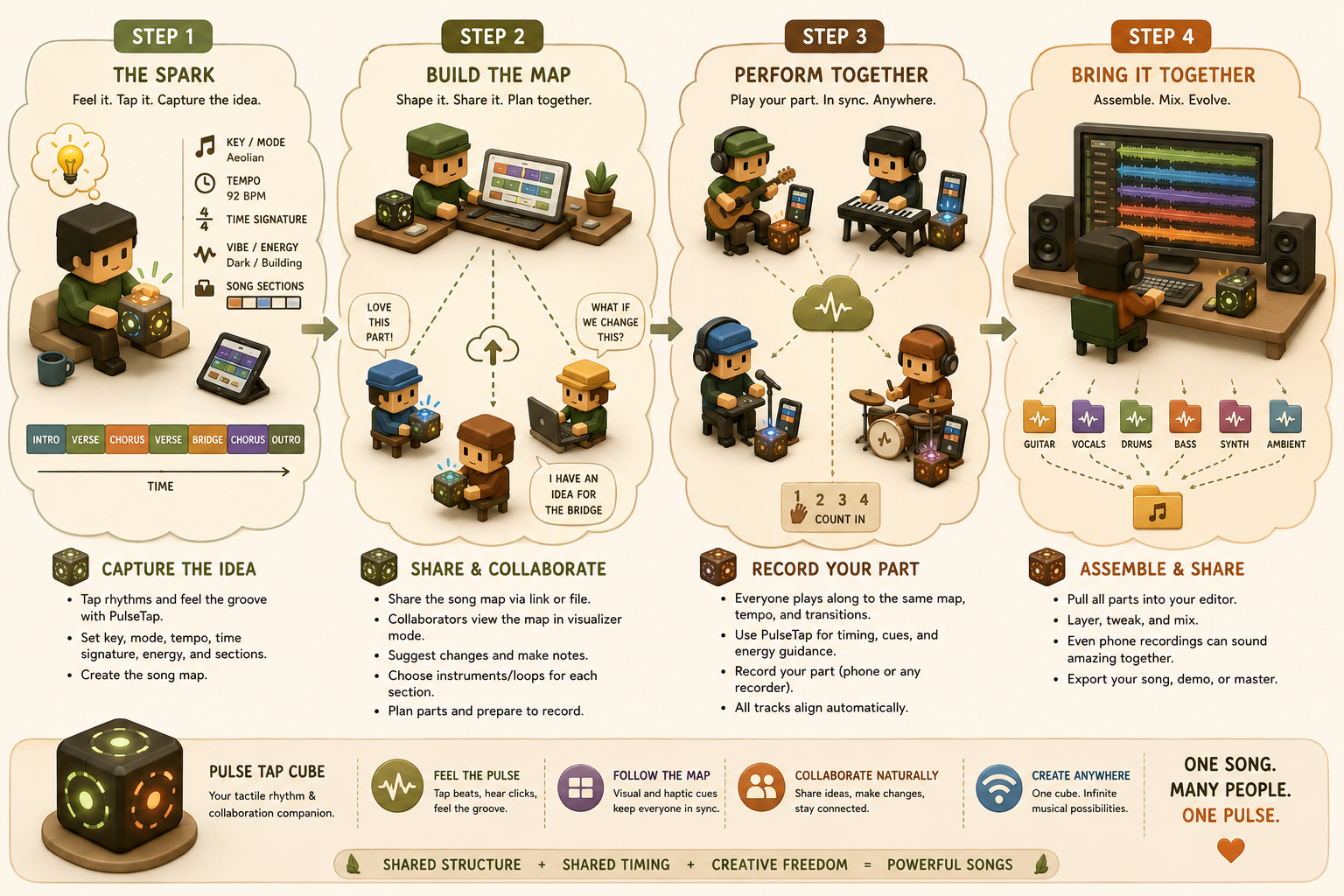
Musicians sketch loops, melodies, textures, percussion, and harmonic ideas privately in headphones before contributing them to the arrangement.
Tempo, key, mode, transitions, energy, and section flow become visible to everyone in the room.
The host acts like a conductor: organizing sections, activating parts, shaping transitions, and guiding the collective performance.
The visualizer becomes the rehearsal roadmap: showing sections, transitions, pulse, timing, cues, and arrangement flow for everyone together.
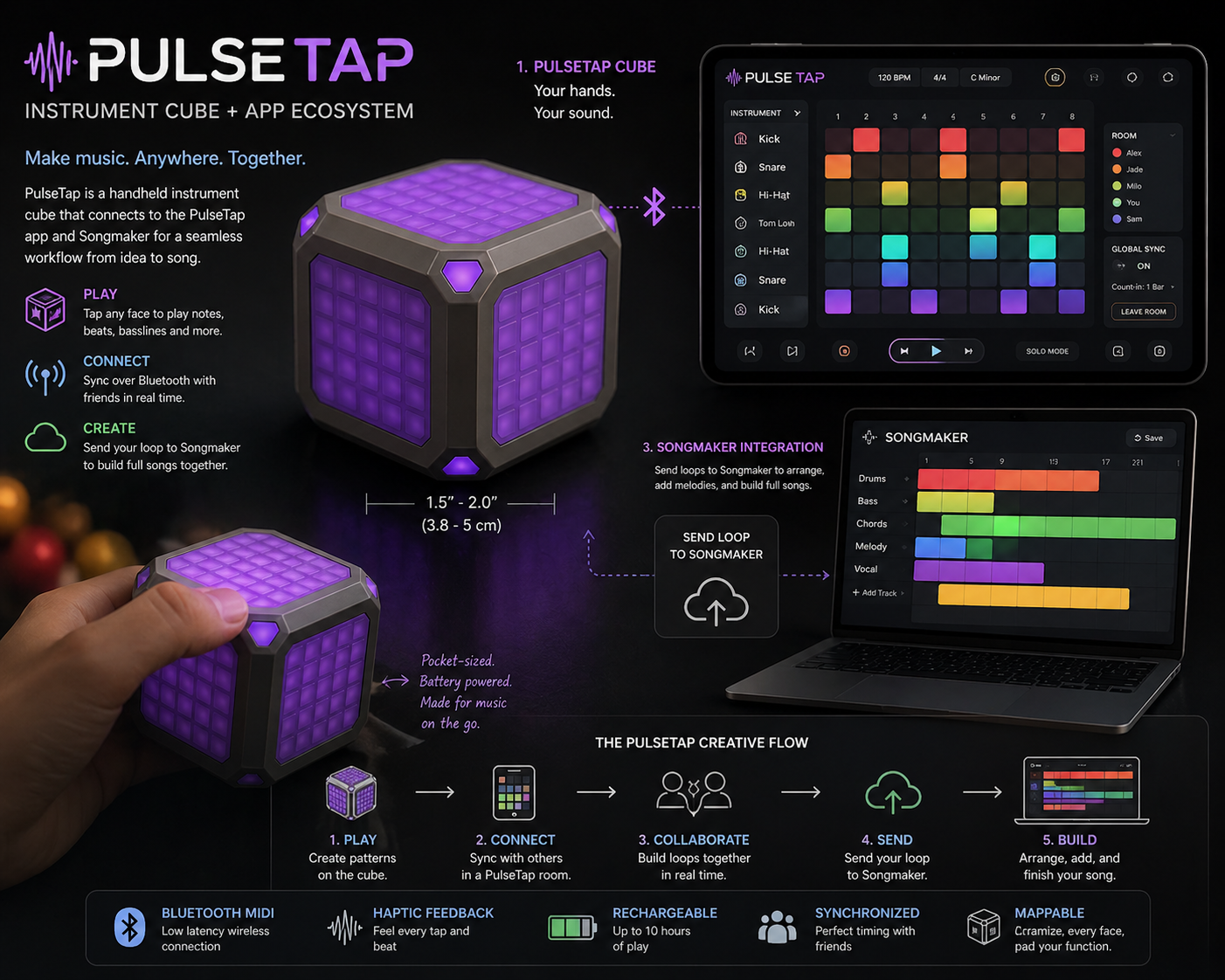
PulseTap is where the idea is shaped. Songmaker is where the idea becomes a finished song. One defines structure—the other defines detail. Songmaker captures intention. PulseTap turns intention into synchronized interaction.
Every PulseTap session is guided by a host: a conductor surface where loops, players, sections, and transitions become a structured musical performance..
One host creates a room code. Players join from phones. Each phone plays its own tap immediately, then sends a timestamped event to the session server. The host collects loops, sees the room, and shapes song structure.
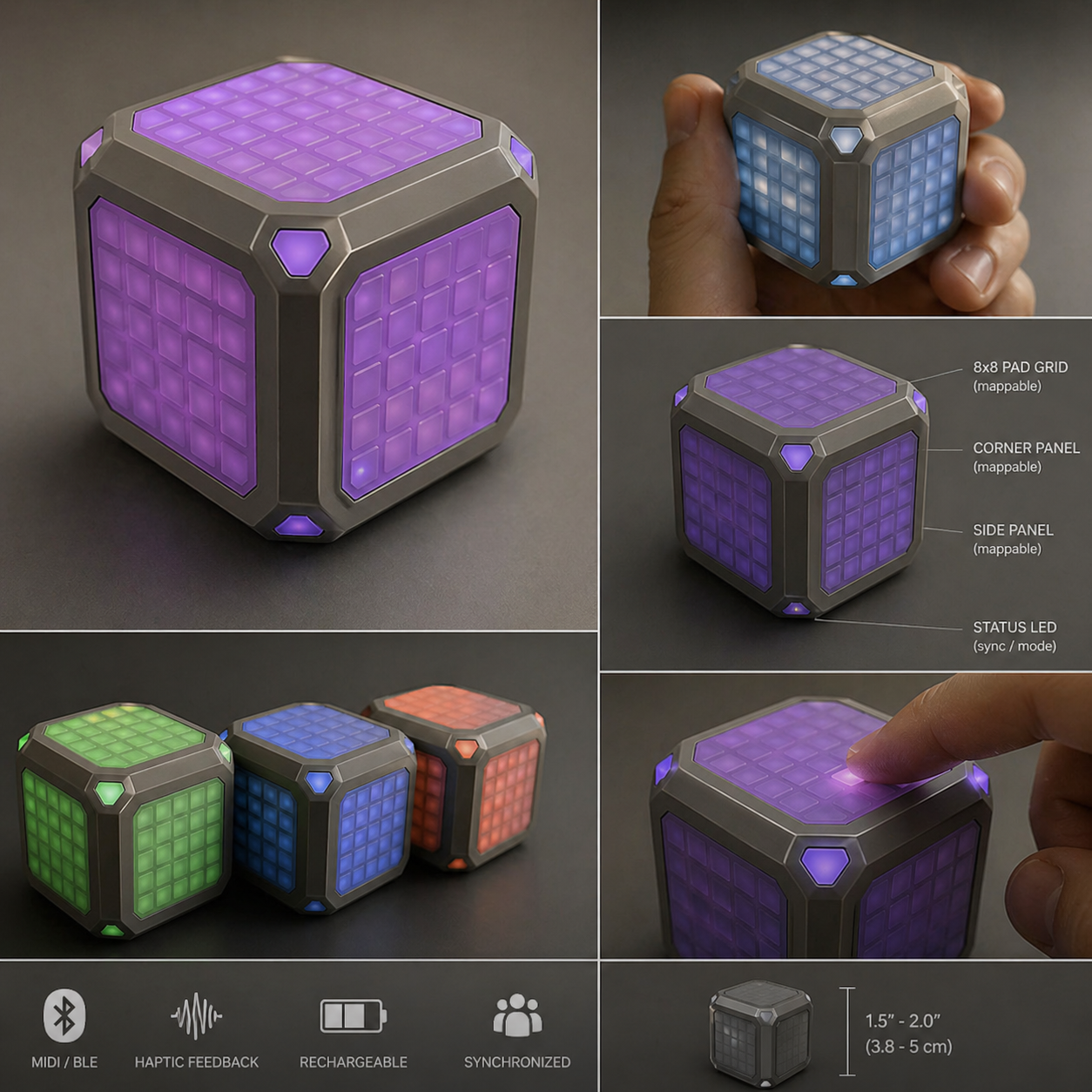
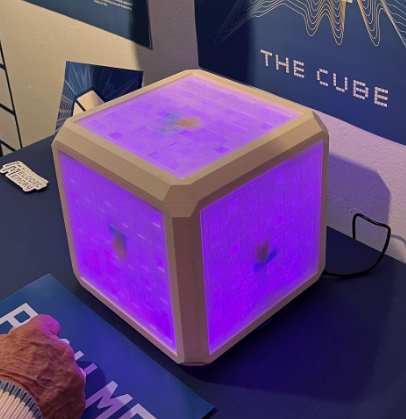
This early cube image captures the core design language: a glowing center, protective outer frame, recessed panels, and the feeling that the object is both instrument and artifact.
A kid on a bus, skateboard at his feet, headphones on. He builds a beat by tapping, locking, and unlocking his cube. Later the beat is shared, expanded, played along with, and turned into a track. A rhythm becomes a song.
Build beats, melodies, and textures on the move.
Send ideas, layer sounds, and build songs with anyone, anywhere.
Quantization and timing tools bring human input as close to simultaneous as possible.
PulseTap captures the framework of a song—tempo, key, energy, and flow—so artists can later bring it fully to life.